About Me
Projects
Blogs
Online Content
© 2026 /Hadi Rouhani
BlogJuly 30, 2026

Azure Virtual Networks for AI Workloads: Reading the Baseline Microsoft Foundry Architecture

Avatar
Hadi Rouhani
Azure Virtual Networks for AI Workloads: Reading the Baseline Microsoft Foundry Architecture

Overview

Microsoft's Get Started with AI Architecture Design guide is the entry point into the Azure Architecture Center's AI content, and it centers on one diagram: the baseline end-to-end chat architecture using Microsoft Foundry. It's a dense diagram — identity, networking, monitoring, and governance all in one picture — and the networking part of it is exactly the VNet and private endpoint pattern worth understanding in detail, because it's the same shape you'll reuse for almost any production AI workload on Azure (RAG chat apps, agent services, anything fronting Azure OpenAI). This post walks through that reference architecture specifically through a networking lens: what each subnet is for, what sits behind a private endpoint and why, how traffic gets in and out, and the requirements that make the whole thing actually resolve correctly.
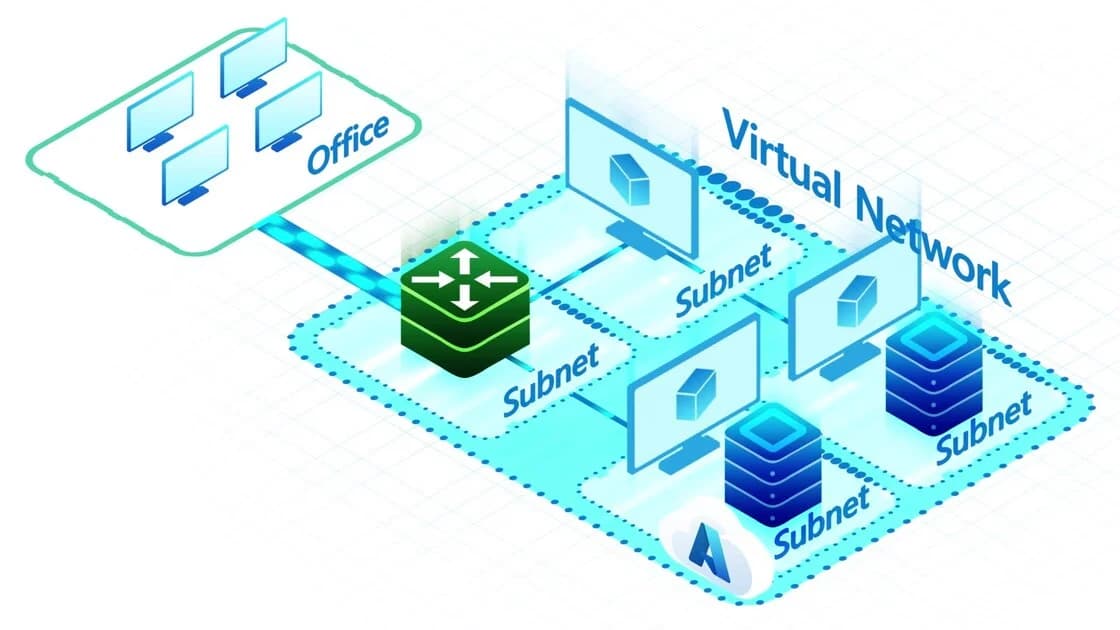
A Virtual Network split into subnets, each hosting its own resources, with an office network connecting in
The pattern in miniature: a VNet isn't one flat network — it's carved into subnets, each scoped to a concern. The Foundry architecture below just applies this at production scale.

The Reference Architecture, in Networking Terms

The baseline Microsoft Foundry chat reference architecture describes a VNet containing several purpose-built subnets:
  • App Service integration subnet — outbound VNet integration for the client web app (Azure App Service).
  • Private endpoint subnet — hosts the private endpoints for the app's dependencies (Storage, Key Vault, and others).
  • Microsoft Foundry integration subnet — private connectivity into the Foundry account/project.
  • Azure AI agent integration subnet — private connectivity for Foundry Agent Service traffic.
  • Azure Bastion subnet — browser-based, no-public-IP RDP/SSH into the environment.
  • Jump box subnet — a managed VM for administrative access, reached via Bastion rather than a public IP.
  • Build agents subnet — self-hosted CI/CD agents that need private connectivity into the VNet (for deploying into resources with no public access).
  • Azure Firewall subnet — the network's single egress point.
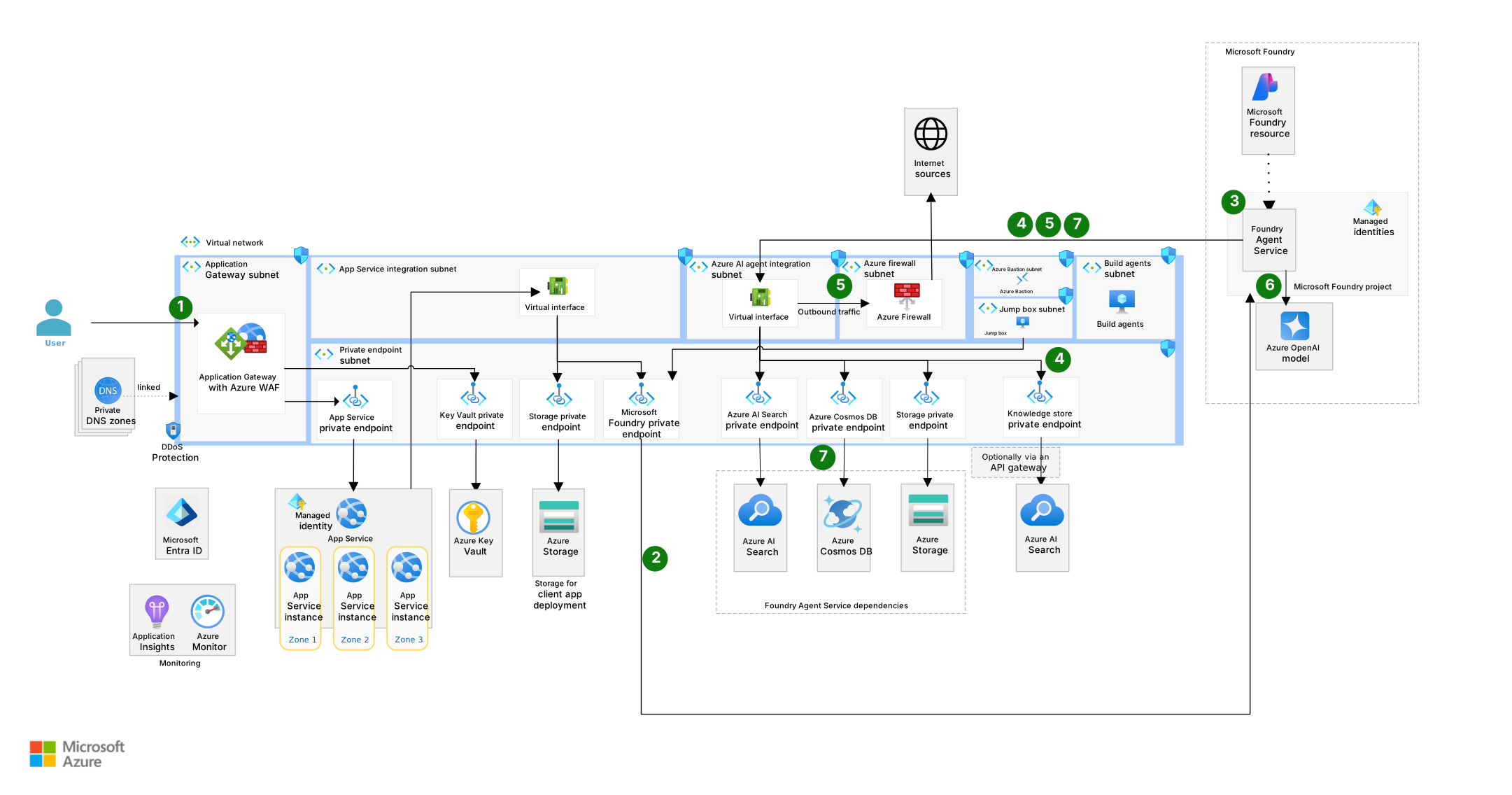
In front of all of it: an Application Gateway with a Web Application Firewall (WAF), itself protected by Azure DDoS Protection, handling inbound traffic. Behind it, private DNS zones make sure that once a resource is reachable only via private endpoint, its normal hostname still resolves correctly from inside the VNet. This is the same VNet/subnet/private-endpoint vocabulary that applies to any Azure workload — the interesting part is seeing it mapped onto a real, Microsoft-published AI architecture instead of a generic example.
The full baseline Microsoft Foundry chat architecture diagram, showing the Application Gateway, VNet subnets, private endpoints, Azure Firewall, and Microsoft Foundry resources
The full diagram: user traffic enters through the Application Gateway (1), private endpoints fan out from a dedicated subnet to Foundry, Storage, Key Vault, AI Search, and Cosmos DB (2), Foundry Agent Service reaches the Foundry project over its own integration subnet (3–5), and outbound traffic exits only through Azure Firewall — with Bastion and a jump box as the sole path for administrative access.

What Sits Behind a Private Endpoint (and Why)

In this architecture, private endpoints connect to:
  • Azure App Service (the client app itself, reached from the App Gateway)
  • Azure Key Vault (secrets, keys, certificates)
  • Azure Storage (used for the app's data and deployment artifacts)
  • Microsoft Foundry (the account and project — model access, agent hosting)
  • Azure AI Search (retrieval for RAG scenarios)
  • Azure Cosmos DB (chat history / state)
  • Knowledge stores used for grounding
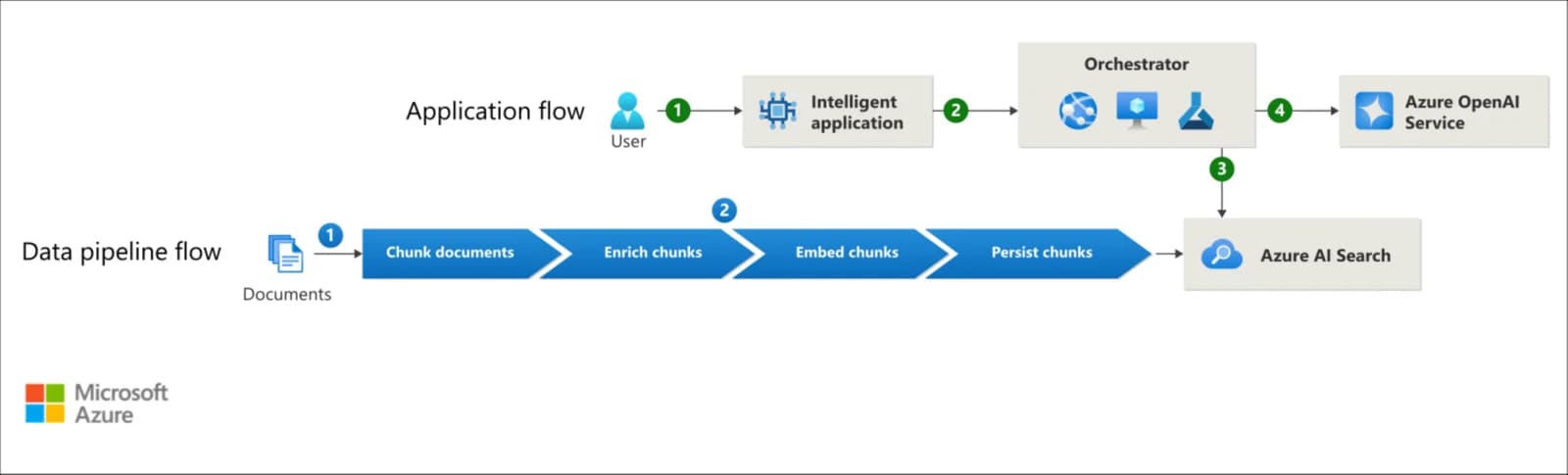
Each of these needs its own private endpoint and its own matching private DNS zone — the same "one zone per resource type" rule applies regardless of how AI-specific the resource sounds: | Resource | Typical private DNS zone | | --- | --- | | Storage (blob) | privatelink.blob.core.windows.net | | Key Vault | privatelink.vaultcore.azure.net | | Cosmos DB (SQL API) | privatelink.documents.azure.com | | Azure AI Search | privatelink.search.windows.net | | App Service | privatelink.azurewebsites.net | | Microsoft Foundry / Azure OpenAI | privatelink.cognitiveservices.azure.com and privatelink.openai.azure.com (Foundry accounts can need both, depending on which API surface is called) | The practical implication: a "simple" RAG chat app can easily need five or six separate private endpoints, each needing its own DNS zone (or a shared zone linked correctly), each consuming an IP in the private endpoint subnet. This is exactly why the reference architecture gives private endpoints their own dedicated subnet rather than scattering them across the app's other subnets — it makes IP planning and NSG rules for that one subnet easy to reason about in isolation. It helps to see why AI Search and Cosmos DB specifically show up on that list. Zoom into the application layer and there are two flows running side by side — the user-facing request path, and a separate data pipeline that populates the index those requests search against:
High-level RAG architecture showing the application flow (user to orchestrator to Azure OpenAI) and the data pipeline flow (documents chunked, enriched, embedded, and persisted into Azure AI Search)
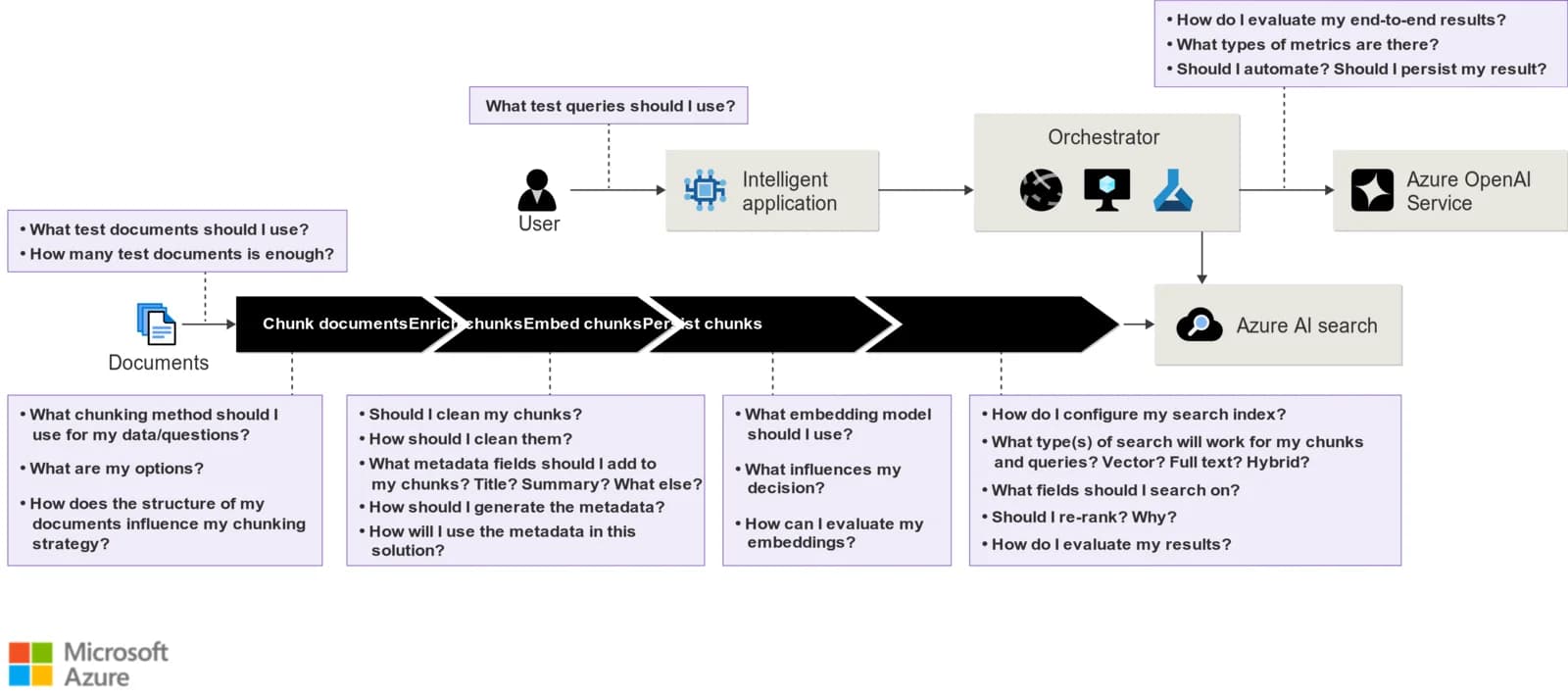
Two flows, one index: the application flow (top) answers user requests via the orchestrator and Azure OpenAI; the data pipeline flow (bottom) is what keeps Azure AI Search populated in the first place. Both flows cross the private endpoint boundary — one at query time, one at ingestion time. Every stage in the data pipeline flow is a design decision that also happens to determine which resources need a private endpoint in the first place — chunking strategy, what gets embedded, and where the persisted output lives:
The same RAG flow diagram, annotated with the open design questions at each pipeline stage — chunking, enrichment, embedding, and index configuration
The same flow with the questions that actually drive the architecture: chunking method, embedding model, index configuration. Answering these decides whether the workload ends up needing just Azure AI Search behind a private endpoint, or AI Search plus a separate knowledge store and Cosmos DB as well.

Ingress: Application Gateway, WAF, and DDoS Protection

Traffic into the environment doesn't hit App Service directly. It goes: User → Azure DDoS Protection → Application Gateway (WAF) → private endpoint → App Service (VNet-integrated) The Application Gateway is the only piece of this architecture with a public IP. The WAF tier filters common web attack patterns before traffic ever reaches the app, and DDoS Protection covers the gateway's public IP itself. App Service, despite being the thing users are ultimately talking to, never has a public-facing network path in this design — it's reached only through the gateway, over the VNet.

Egress: Azure Firewall as the Single Exit

Outbound traffic — including calls the app or an agent needs to make to Azure OpenAI, to the internet, or to other Azure services not reached via private endpoint — routes through Azure Firewall, the one subnet in this design dedicated purely to controlling what's allowed to leave the VNet. This matters for AI workloads specifically: model endpoints, package registries for build agents, and any third-party API a RAG pipeline calls out to all need explicit egress rules, or they simply won't resolve/connect once the VNet's outbound path is locked down.

Identity: Managed Identities Over Keys

The diagram also shows managed identities connecting Foundry Agent Service to the Microsoft Foundry project, which in turn accesses Azure OpenAI — with Microsoft Entra ID handling authentication throughout. None of this is API-key-based. Combined with the private endpoint layer, the pattern is: network isolation gets you "unreachable from outside," and managed identity + Entra ID gets you "no long-lived secret to leak in the first place." Both layers matter — private endpoints alone don't help if a leaked key still authenticates from anywhere.

Requirements Checklist, Applied to This Pattern

  • [ ] A VNet with separate subnets per concern (private endpoints, App Service integration, Foundry integration, agent integration, Bastion, jump box, build agents, firewall) rather than one flat subnet
  • [ ] Private endpoint subnet sized with headroom — count every dependency (Storage, Key Vault, Foundry, AI Search, Cosmos DB, knowledge stores) × sub-resources, not just "one per service"
  • [ ] A private DNS zone per resource type, linked to every VNet that needs to resolve it (including any peered VNets or landing-zone hub)
  • [ ] Application Gateway + WAF as the only public ingress path; App Service reachable only through it
  • [ ] Azure Firewall (or equivalent) as the only egress path, with explicit allow-rules for model endpoints and any external APIs the app/agents call
  • [ ] Managed identities used for service-to-service auth (Foundry Agent Service → Foundry project → Azure OpenAI) instead of API keys
  • [ ] Bastion + jump box for administrative access — no public RDP/SSH anywhere in the VNet
  • [ ] Build agents given private connectivity into the VNet, since CI/CD needs to reach resources that no longer have public network access
  • [ ] Connectivity verified end-to-end before disabling public network access on any resource

Common Pitfalls Specific to This Pattern

  • Treating Foundry/Azure OpenAI like a "normal" private-linked resource and forgetting it can need more than one DNS zone, depending on whether calls go through the Foundry-specific API surface, the OpenAI-compatible surface, or both.
  • Sizing the private endpoint subnet for today's dependency count, then adding AI Search, a second knowledge store, or another Cosmos DB container group later and running out of IPs.
  • Locking down egress through Azure Firewall before confirming which endpoints the app and agents actually call — RAG pipelines especially tend to reach more external surfaces (embedding APIs, search indexes, occasionally third-party data sources) than the initial design accounts for.
  • Skipping the landing-zone variant when the workload is actually going into an enterprise environment — the baseline Microsoft Foundry chat architecture in an Azure landing zone exists specifically because hub-and-spoke, centralized firewalls, and shared DNS zones change some of the assumptions above (e.g. DNS zones often live in the hub, not the spoke).

Where to Go Next

  • Get Started with AI Architecture Design — the source article this post is built around
  • Baseline Microsoft Foundry chat reference architecture — the full deployable reference this diagram comes from
  • Baseline Microsoft Foundry chat architecture in an Azure landing zone — the enterprise-scale variant
  • Design a secure multitenant RAG inferencing solution — if the workload needs tenant-level isolation on top of everything above
Share this post:

Recent posts

Thumbnail of End-to-End Workflow: From Development to Production on Google Cloud
Avatar
Hadi Rouhani
March 1, 2026
End-to-End Workflow: From Development to Production on Google CloudDevOps
Thumbnail of Mapping a Custom Domain to Google Cloud Run with Porkbun
Avatar
Hadi Rouhani
March 1, 2026
Mapping a Custom Domain to Google Cloud Run with PorkbunDevOps